Why I Still Update WordPress Plugins Manually
The updates are routine. The opportunity to inspect what's accumulated isn't.
- Plugin Management
- Security
- Technical Debt
- Website Maintenance
- WordPress
Most of my clients would probably be surprised to learn that I personally handle their WordPress plugin updates.
It’s monotonous work. It isn’t especially difficult. And there are plenty of services that will happily automate the entire process, complete with backups, visual regression checks, and a report saying everything went fine.
But I keep doing it myself.
Not because I enjoy clicking Update now. Because the update process is one of the few recurring opportunities to stop working on a website and take a hard look at the system we’ve been operating.
If you’re responsible for maintaining a site and you’ve completely automated that moment away, you may have automated away one of your most valuable responsibilities.
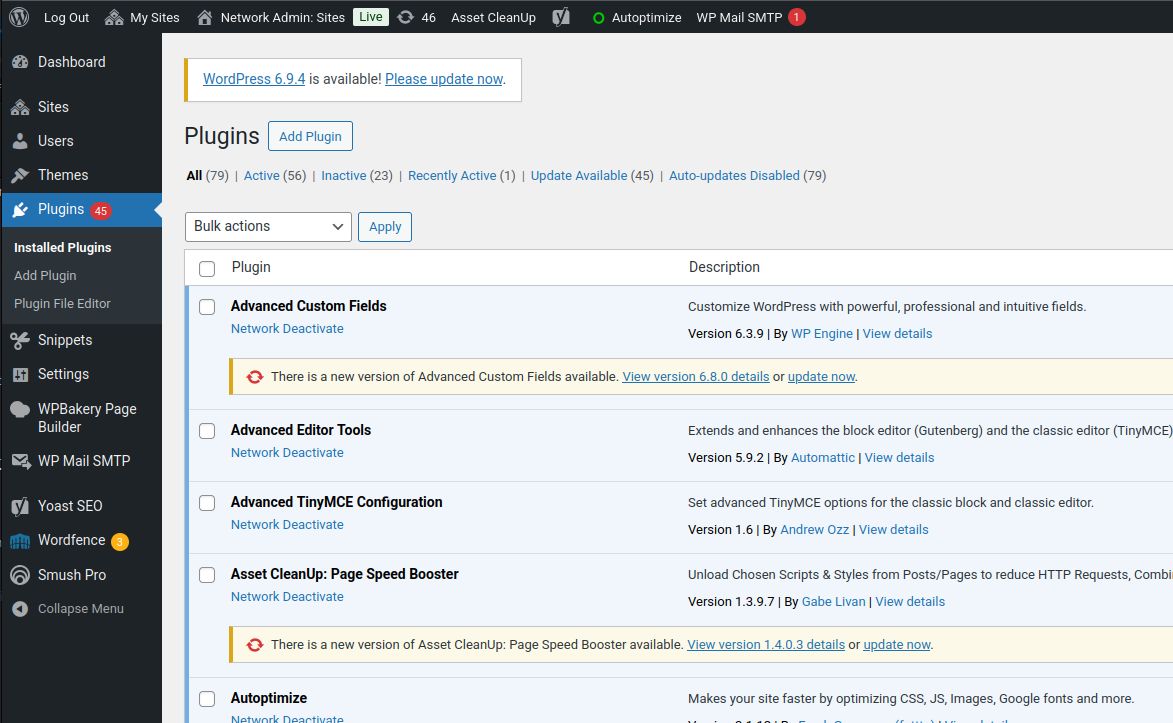
The problem isn’t outdated plugins. It’s entropy.
One of the most consistent things I encounter when taking over a WordPress installation is accumulation.
A plugin was installed to solve a problem three years ago. A second plugin arrived during a redesign. A third was added by an agency that didn’t realize the first two already handled most of the requirement. A particular feature stopped being used, but the plugin stayed because nobody wanted to risk removing it.
None of those decisions necessarily looked unreasonable at the time.
That’s how a system ends up with 50, 60, or 80 plugins and no coherent explanation for why they’re all there.
The problem isn’t automatically the number. A large multisite network and a small brochure website have very different needs. A well-maintained stack of 40 plugins can be easier to live with than a neglected stack of 12.
The problem is when nobody owns the decisions anymore.
WordPress makes extending a site remarkably easy. That’s one of its greatest strengths; it’s part of why its ecosystem ultimately won me over. But that same accessibility makes it easy to keep adding solutions without ever revisiting the old ones.
Software accumulates. Responsibilities overlap. The website still works—until it doesn’t.
What I’m actually looking at during an update
When I open the Plugins screen, I’m not just scanning version numbers. I’m looking for evidence that the site has drifted away from its original intentions.
I ask questions like:
- Do we still need this? Is the feature even in use, or did the campaign, integration, or workflow disappear years ago?
- Why are there two plugins doing essentially the same thing? Is the overlap intentional, or did it emerge across multiple rounds of development?
- Who owns it? Is it maintained, supported, and compatible with the rest of the stack?
- What changed? Does the changelog suggest a routine fix, a breaking change, a new dependency, or a feature we should know about?
- Could this be simpler now? Is the capability already handled by WordPress, our existing theme or application code, or another plugin we already maintain?
- What would happen if we removed it? Are there shortcodes, stored data, scheduled jobs, integrations, or dependencies that would make removal unsafe?
These aren’t all questions I can answer in one sitting. Sometimes the answer is just a note to investigate later.
That’s fine. Noticing the question is already better than never asking it.
A plugin update is also a useful reminder that the surrounding platform is changing. PHP requirements move. WordPress APIs evolve. Dependencies get deprecated. Something that was the right choice five years ago may no longer be the right choice today.
You don’t learn any of that from a green checkmark alone.
Automation can validate an update. It can’t justify an installation.
I’m not arguing against automation as a technical capability.
Backups are good. Automated tests are good. Visual regression checks are good. Monitoring is good. If a managed update system catches a broken checkout or a missing navigation element, it’s doing valuable work.
But those tools generally answer a narrow question: Did this change appear to break anything?
They don’t answer a more important architectural question: Should this component still exist?
An abandoned plugin can update successfully. Two competing optimization plugins can both pass a screenshot comparison. A deprecated integration can continue running for years without throwing a visible error.
Automation is good at repeating a known process. It’s much less useful when the work is to question whether that process still makes sense.
And the more seamless maintenance becomes, the easier it is to confuse everything is current with everything is healthy.
A successful plugin update is not a plugin audit. It tells you that a version changed, not whether the plugin is necessary, appropriately configured, actively supported, or still the best solution.
The obvious objection: what about security?
This is the fair pushback, and it’s worth addressing directly.
If an actively exploited vulnerability is disclosed, the answer isn’t to wait until the next leisurely maintenance session so I can enjoy an architectural review. The answer is to assess the exposure and patch or mitigate it promptly.
Security response and routine stack review are different jobs. Both need to happen.
A sensible maintenance model has a way to detect vulnerable components independently of someone visiting the Plugins screen. It treats urgent security releases differently from ordinary feature updates, verifies that backups and recovery options exist, and tests critical functionality after changes.
WordPress itself supports automatic plugin updates, and there are legitimate environments where selective automatic updating reduces exposure. Nothing about my preference for hands-on maintenance makes that option inherently irresponsible.
Likewise, manual does not automatically mean careful. If someone logs in once every few months and blindly bulk-updates everything, they’ve retained the clicking without gaining the awareness.
My argument is about the discipline of regular, deliberate review—not about intentionally delaying fixes.
Don’t hold a known security fix for the sake of a scheduled audit. Vulnerability monitoring and urgent patching should operate on their own timetable. Routine maintenance is where you review the broader stack.
The most valuable maintenance work rarely gets a ticket
Most development happens in response to a request.
Build this page. Fix this integration. Add this field. Make this faster. Update this design.
That’s all necessary work, but it’s reactive. Someone has already decided what the task is supposed to accomplish.
Maintenance gives me a chance to look at the site without starting from a ticket. No deliverable to defend, no predetermined solution to implement. Just a system and the question of whether its current shape still makes sense.
Sometimes I find a redundant plugin. Sometimes I discover a dependency worth replacing before it becomes a problem. Sometimes I confirm that the current setup is perfectly reasonable and move on.
The point isn’t to invent work. It’s to maintain enough familiarity with the system to recognize when work is needed.
That knowledge compounds, too. You start remembering which integrations are fragile, which plugins carry historical baggage, and where a future change is likely to have unexpected consequences. Over time, that’s part of what makes maintenance more effective—not just more thorough.
It also happens to be almost entirely invisible to the client.
They see the occasional update report. They don’t necessarily see the decision not to keep a redundant plugin, the abandoned feature that gets flagged for retirement, or the dependency that gets noticed before the next PHP upgrade.
But those are often the decisions that keep a WordPress site manageable over the long term.
Don’t automate away ownership
I’m not particularly interested in whether a developer runs 20 plugin updates by hand or has a well-designed system applying them automatically.
I’m interested in whether that developer can explain what those 20 plugins do, why they’re installed, and what the plan is when one of them becomes a liability.
If automation supports that awareness, great. If it replaces the only moment anyone actually reviews the stack, that’s a problem.
WordPress gets a bad reputation for bloated, fragile installations. Sometimes that’s deserved. But it’s not an inevitable consequence of the platform. It’s what happens when years of reasonable, individual decisions accumulate without someone taking responsibility for the whole system.
Plugin updates are routine.
Knowing what you’re maintaining is the actual job.