Elementor Is the Host, Not the Application
How we built an editable, SVG-driven product explorer for GoDocs without forcing the interaction into the page builder.
- Custom Widgets
- Elementor
- Interactive Experiences
- SVG
- WordPress
Elementor is great at a lot of things. Building complex interactive experiences isn’t necessarily one of them.
That’s not a criticism of Elementor. It’s a recognition that a visual page builder and an interactive application have different responsibilities. Trying to make one do the other’s job usually introduces compromises that neither the developer nor the person maintaining the site actually wants.
We ran into exactly this with GoDocs, a company that builds commercial loan document automation software.
They wanted a more visual, interactive way to show how their products fit together. The site was already built with Elementor, and the people maintaining it needed to keep editing content in the interface they knew. The requirement wasn’t just to make something interesting happen on the page. It was to make that interaction manageable after we handed it over.
You can see the result on GoDocs’ product overview page.
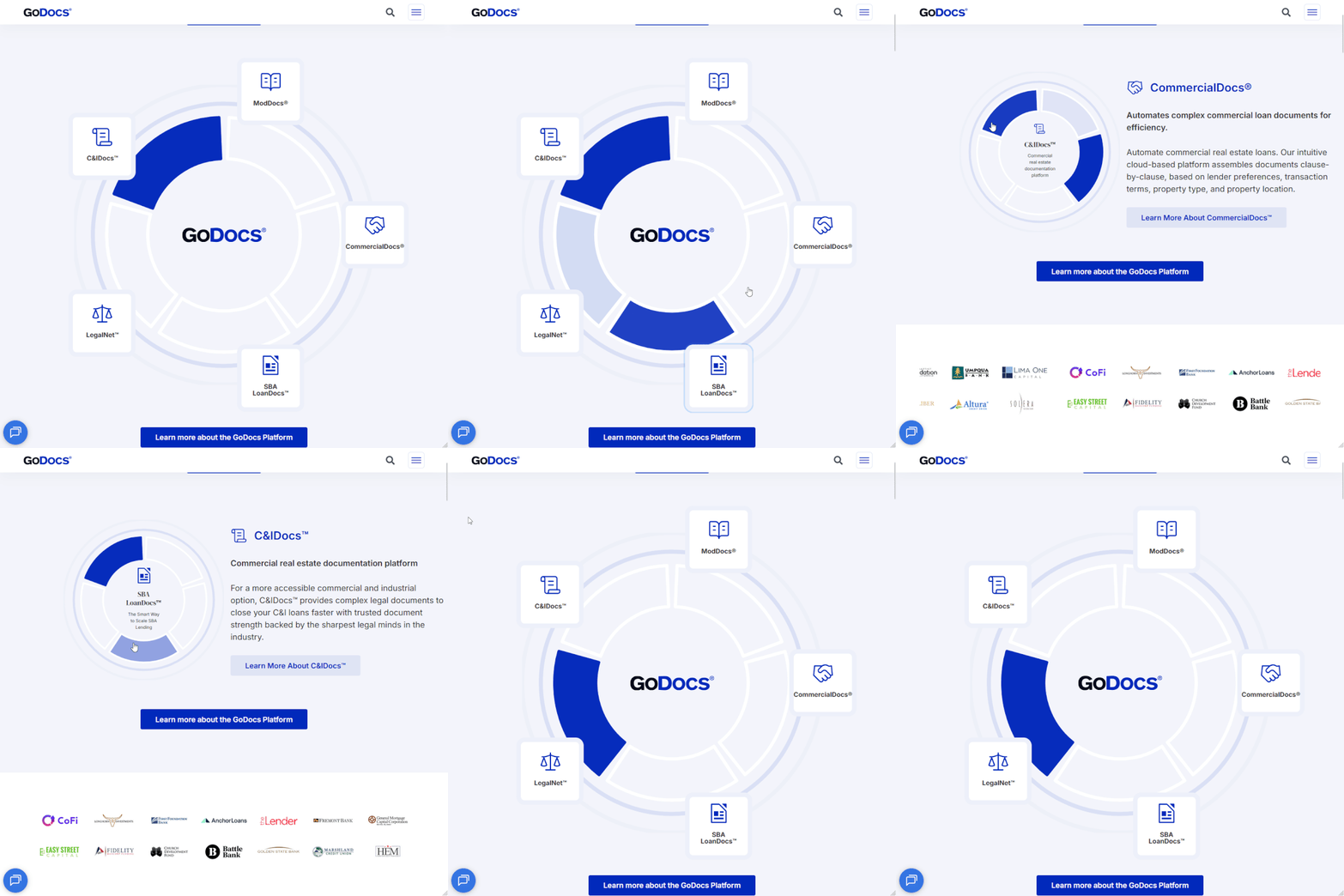
The problem wasn’t Elementor
Elementor is quite good at its intended job: composing layouts, placing content, managing presentation, and allowing non-developers to work on pages without needing to touch code.
GoDocs needed something more specific. The experience had to communicate the relationships among products using a custom SVG, animation, and interactive behavior. It also had to let editors manage the content behind that experience: sections, labels, links, and the number and order of interactive segments.
Those are two very different concerns.
You can build a lot of visual complexity by combining existing page-builder elements. But once the experience has meaningful application state and custom interaction rules, adding more nested elements and configuration isn’t necessarily making it easier to maintain. At some point you’re implementing application logic through a layout editor.
The opposite approach isn’t ideal either: build an entirely independent interactive graphic, embed it on the page, and leave the client with a black box that only a developer can change.
We wanted neither.
Make Elementor the host
The solution was a custom Elementor widget, packaged as its own WordPress plugin.
From an editor’s perspective, it behaves like another element on the page. The team can work with it in Elementor and update the information it presents without editing JavaScript or SVG source.
From a developer’s perspective, the widget is a boundary. It connects Elementor’s controls and saved content to a self-contained front-end component. The interaction does not have to be assembled out of Elementor’s ordinary layout features.
The responsibility split looks like this:
| Layer | Responsibility |
|---|---|
| Elementor editor | Expose the content and configuration the GoDocs team should be able to change |
| Custom WordPress plugin | Register and integrate the widget with Elementor |
| SVG and front-end component | Generate the segmented graphic from the configured sections, then handle animation and user interactions |
| JavaScript and styles | Implement and present the behavior without making the editor responsible for it |
The important part isn’t that we wrote a plugin. It’s where we drew the boundary.
The editor owns the things editors should own. The component owns the things code should own.
Editable doesn’t have to mean visually constructing every behavior in a page builder. A good editing interface exposes the decisions a content team needs to make and keeps the implementation details out of their way.
Editability was part of the engineering requirement
It’s relatively easy to ship an impressive interaction when all the content is hardcoded. It’s harder to make it flexible without giving non-technical users a hundred low-level settings they shouldn’t need to understand.
For GoDocs, those controls are not just text fields pasted onto a fixed graphic. Elementor has a repeater for the interactive sections. Editors can add, remove, and reorder sections within the widget’s supported range, as well as manage each section’s icon, title, short and long copy, button text, and link. The component uses that configuration to determine what to render. That means the public presentation can remain a custom-built experience without treating every content update as a software development task.
Think of the difference between these two requests:
- “Change this product’s label and destination link.”
- “Change the animation logic and how the SVG responds to a selection.”
The first belongs in the editorial workflow. The second belongs in code.
If you expose too little, your client has to call a developer for routine changes. Expose too much, and the editor becomes a fragile application configuration system. Getting that division right is most of the work.
The SVG adapts to the content
This is the part I find most interesting after looking at the actual widget code: the SVG isn’t a fixed image waiting for content to be inserted.
The custom Elementor widget defines a repeater for its sections, with a section ID, icon, title, descriptions, and call-to-action fields. The implementation intentionally caps that configuration at six sections rather than promising a completely unconstrained page-builder experience.
On the front end, the widget renders those sections as structured HTML. JavaScript reads the configured sections, calculates the number of segments, and uses SVG.js to draw the radial segments. The layout is derived from the content model rather than hand-authored SVG markup for each product.
Here’s the essential relationship, directly from the widget’s JavaScript:
const numSegments = sections.length;
const angleStep = 360 / numSegments;
That angle is then used to calculate each segment’s path. Adding or removing a section changes the geometry of the visualization without asking an editor to manipulate coordinates or SVG code.
The content and animation states are linked by a data-section identifier. Selecting a segment activates its corresponding detail panel; selecting a content box does the reverse. The custom interaction is still code, but the things it operates on come from Elementor’s saved widget configuration.
This also clarifies an important boundary: editors can alter the structure of the content-driven interaction, not arbitrarily redesign the SVG engine. The visual grammar and behavior are deliberately controlled by the component.
The difference between a configurable application and a completely free-form visual builder matters. We gave editors control over the information and supported section structure, while keeping the geometry, interaction rules, and responsive behavior in code.
Keep the implementation independent
We also treated the widget as a real software component rather than a collection of snippets pasted into Elementor.
Development happened locally, the implementation was versioned in Git, and the interactive layer had its own JavaScript, styles, and logic. The plugin has its own source files and build workflow, and registers its CSS and JavaScript as Elementor widget dependencies. Elementor was the integration point, not the development environment for the application itself.
That distinction changes how you work.
When the interaction needs to change, you can work on the component, review the code, and deploy it through a normal development workflow. The JavaScript even accounts for Elementor editor re-renders by cleaning up listeners and observers from previous instances. When an editor needs to change product copy or a link, they can make that change in Elementor. Neither side has to impersonate the other.
There is also a practical maintenance benefit to keeping responsibilities clear. A developer coming into the project later can identify the custom application code instead of reconstructing an interaction from scattered page-level settings, embedded scripts, and layout workarounds.
None of this requires rejecting the existing site architecture. In fact, that’s the point: you can build the part that needs engineering rigor without rebuilding the parts that already work.
Why not just use another widget library?
For ordinary interactions, I would absolutely start by looking at existing Elementor capabilities and extensions. There’s no virtue in custom development for its own sake.
But this request wasn’t for a generic carousel, hotspot image, or animated card. It was a particular product presentation with its own content relationships, SVG rendering, and interaction model.
A general-purpose widget tends to give you the settings its author anticipated. That can be excellent when your requirements match those settings. It becomes awkward when the job is to express something specific and the configuration surface starts dictating the experience.
Here, a purpose-built component meant the client got precisely the controls they needed, and we could implement the interaction directly rather than bending a broader plugin into shape.
Before choosing a general-purpose plugin or a custom component, ask two questions: Who will maintain the content? And who will maintain the behavior? If the answers are different people, the implementation should probably acknowledge that distinction.
The page builder isn’t the product
The result is an interactive product overview that lives naturally inside GoDocs’ existing Elementor site. Visitors see the experience. Editors see an editable widget. Developers see an isolated component with a conventional development workflow.
Those are different views of the same feature, and they don’t need to share the same tools.
This is a pattern I keep coming back to across WordPress projects. A CMS or page builder doesn’t need to be responsible for every behavior on a page to be useful. It needs to provide a reliable place for the content and an appropriate way to integrate the things it doesn’t do natively.
That’s also why I don’t think the answer to every ambitious interface is replacing the CMS, moving everything to a JavaScript application, or installing a giant add-on suite.
Sometimes the better solution is much smaller: one custom component, with a clearly defined boundary, living inside the system the client already uses.
The mistake is trying to make one system do the entire job.
Use the platform for what it’s good at. Build the rest alongside it.