Stop Re-Tagging Your Product When Analytics Tools Change
A small event bus for Apex Leadership gave product code one job: describe what happened, not decide which analytics platform gets to hear about it.
- Analytics Architecture
- Event Tracking
- Google Tag Manager
- JavaScript
- PostHog
- VWO
Migrating events from VWO to PostHog should not require re-tagging half your product.
But that is exactly what happens when tracking decisions live all over the application.
A button gets a VWO event. Another flow gets a GA4 call. Someone adds a PostHog capture. GTM starts listening for a few things. Before long, developers are maintaining a collection of vendor-specific tracking integrations that nobody set out to build.
I wrote about the technical debt hiding in analytics events. This is the practical follow-up: a small event bus I put together for Apex Leadership to keep product behavior separate from the tools consuming it.
The requirement wasn’t a new analytics platform. It was a cleaner way for developers to say what happened in the product, while giving the analytics and experimentation layer control over what happens next.
The migration that makes the problem obvious
Apex was thinking more seriously about experimentation, analytics, and event tracking. VWO was the immediate concern, but the larger issue was familiar: whatever tool matters today won’t necessarily be the tool that matters next year.
The first version of event tracking is usually fine. You need to know when someone clicks a CTA, so you add a tracking call. A new experiment needs a conversion event, so you add another. Nothing feels broken.
Then the team migrates from one tool to another.
Now someone has to find all the places where those events were emitted, figure out which ones still matter, translate their names and properties, and re-tag product features that haven’t otherwise changed.
That’s a lot of product engineering work for what is fundamentally an analytics decision.
When the Apex team reviewed the approach, the reaction was immediate:
“It solves a huge problem we’ve had with tool migration. Like when we switched from VWO to PostHog, we had to go back and manually re-tag everything, which was a real pain. This abstraction layer totally fixes that for us.”
That quote gets at the real cost. Not the difficulty of firing an individual event, but the cost of making the same product change again every time something downstream changes.
Give the application one job
The pattern is intentionally small. Product code emits a stable event through one API. It doesn’t need to know whether the event ends up in VWO, PostHog, GA4, or nowhere at all.
In the reference implementation I published on GitHub, the developer-facing API is just AnalyticsBus.send():
import AnalyticsBus from './analytics-bus.js';

AnalyticsBus.send('cta_click', {
    label: 'Hero CTA',
    location: 'homepage_hero',
});

AnalyticsBus.send('video_play', {
    videoId: 'intro-123',
    positionSeconds: 0,
});
There isn’t anything magical about that API. The value is what it doesn’t require developers to know.
The application describes a product event and supplies the relevant context. That’s it. It doesn’t decide which experimentation tool needs the event, how an analytics vendor names it, or whether it should be sampled.
Those concerns belong somewhere else.
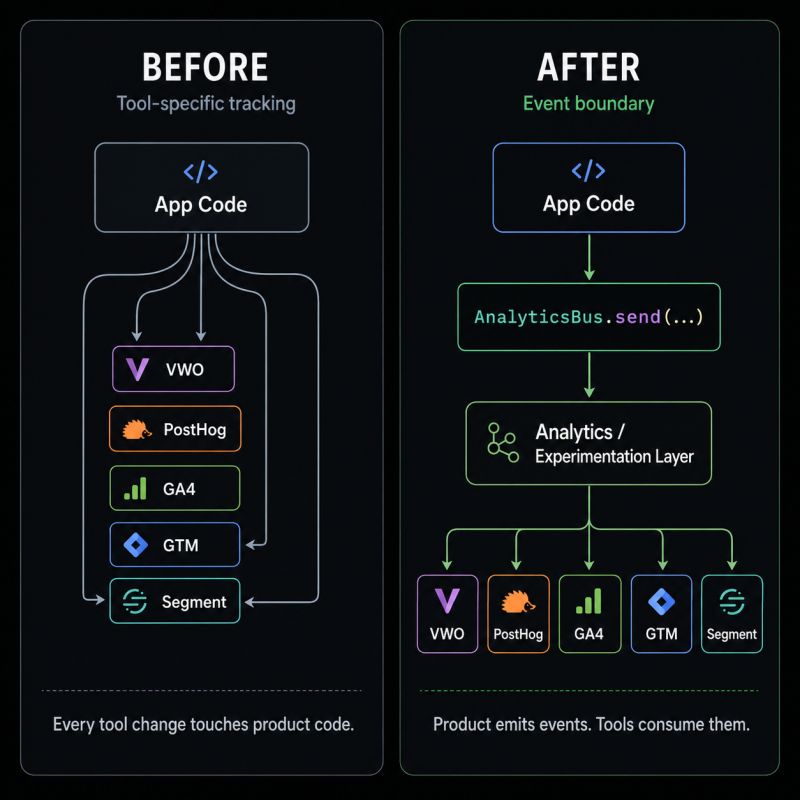
What the bus actually does
The application side is a tiny JavaScript module. It packages an event name and payload into a message and dispatches it on the page:
const AnalyticsBus = (() => {
    const MESSAGE_TYPE = 'app_analytics_event';

    function send(name, payload = {}) {
        if (typeof window === 'undefined') return;

        window.postMessage(
            {
                _type: MESSAGE_TYPE,
                name: name,
                payload: payload,
            },
            window.location.origin
        );
    }

    return { send };
})();

export default AnalyticsBus;
This is a shortened excerpt from the gist, not a new event-processing framework. There is no queue, no dedicated server, and no new dependency to manage.
The receiving side is where the decisions move. The reference listener is designed to run as a GTM Custom HTML tag. It accepts messages of the expected type, checks their origin, compares event names against an allowlist, and forwards permitted events into dataLayer.
The allowlist can give an event a GTM-facing name and control how frequently it is forwarded:
var EVENT_ALLOWLIST = {
    cta_click: {
        gtmEvent: 'cta_click',
        sampleRate: 1,
    },
    video_play: {
        gtmEvent: 'video_play',
        sampleRate: 1,
    },
};
That’s the whole idea. Developers decide when meaningful things happen. The analytics team decides which of those things need to be tracked and where they go.
In this implementation, GTM is the handoff point. It isn’t claiming to send events directly to five vendors out of the box. The destination-specific configuration still has to be set up. The benefit is that those decisions no longer have to be scattered through the product.
| Responsibility | Owned by |
|---|---|
| Recognizing that a product event occurred | Application code |
| Naming the stable application event and its payload | Product/development team |
| Allowlisting, mapping, and sampling events | GTM listener / analytics configuration |
| Sending approved events to specific vendors | Downstream tags and integrations |
Why this is enough structure
It’s tempting to take a problem like this and build an elaborate tracking platform around it. I don’t think that’s necessary for most teams.
The goal was to remove one painful dependency: application code shouldn’t need to change every time someone adjusts the analytics stack.
A small event bus provides that boundary without dictating the rest of the architecture. It can coexist with the existing GTM setup, the team’s preferred analytics tools, and the normal development process.
It also creates a reasonable place to manage governance. Instead of hunting through application callbacks to stop sending an obsolete event, the analytics layer can decide not to forward it. Instead of renaming the same event in several components, the downstream mapping can translate it for the destination that needs it.
This is a reference pattern, not a universal drop-in analytics library. The gist demonstrates same-origin messaging and a GTM handoff. A production implementation still needs deliberate handling of message validation, consent, event schemas, and the behavior of any cross-frame integrations. Browser event delivery also isn’t a durable substitute for server-side records of critical business operations.
And it doesn’t magically undo an old migration. Existing scattered calls still have to be brought behind the new interface. The win comes afterward, when the next vendor change doesn’t require repeating the same exercise across the product.
Build for the second analytics tool
The first few analytics events are easy. That’s what makes it so tempting to wire them directly into whatever tool is already installed.
The challenge is that the product keeps changing. Marketing needs something new. Product wants better funnels. Experimentation expands. A vendor gets replaced. The same events suddenly have more jobs than anyone anticipated.
The Apex example is a good reminder that a little structure early can eliminate a lot of repeated work later.
You don’t need to predict the next analytics platform. You just need to stop making the application responsible for it.
Let the product describe what happened. Let the tools decide what to do with it.
The complete Event Messaging & GTM Integration Specification is available as a public gist for anyone who wants to inspect the implementation.