We Didn’t Rebuild Salesforce. We Fixed the Workflow.
A two-week Experience Cloud redesign didn't need a new theme framework. It needed a decent development loop.
- Developer Tooling
- Frontend Development
- Salesforce Experience Cloud
- Sass
- Vite
Some systems make simple styling work painful. Salesforce Experience Builder is one of them.
We were overhauling an Experience Cloud portal for a B2B SaaS company as part of a broader platform initiative. The client needed a significant visual improvement, and we had less than two weeks to make it happen.
The mandate was pretty simple: make it not suck.
The obvious problem was the development workflow. The less obvious problem was knowing how much effort not to spend fixing it.
The Platform Wasn’t Going Anywhere
Experience Builder gives you a way to customize a site’s appearance, including a Custom CSS editor. That works well enough for a few adjustments. It’s considerably less pleasant when you’re trying to overhaul an entire portal.
The loop looks something like this:
- Write a CSS change.
- Copy it into Experience Builder.
- Publish or preview it in Salesforce.
- Refresh the page.
- See what broke—or what didn’t change.
- Go back and do it again.
There are two bad responses to a workflow like that.
One is to accept it. Write the styles directly in the platform, live with the slow feedback loop, and gradually build up a collection of overrides that nobody particularly wants to maintain.
The other is to overreact: build the complete platform-approved development architecture, replace theme components, establish a whole new deployment system, and spend hundreds of hours solving a problem that has a two-week deadline.
Neither made sense here.
We weren’t being hired to reinvent Salesforce. We were being hired to make an existing portal look and feel dramatically better, within a real budget and timeline.
Build a Normal Development Loop Around an Abnormal Platform
The answer was to take Salesforce out of the iteration loop, without taking it out of the final product.
We saved the portal pages as complete local snapshots: HTML, stylesheets, JavaScript, and the assets needed to render them. Then we built a small local development environment around those snapshots.
Vite served the pages. Sass gave us organized styles. Hot reload meant we could make a change and see it immediately rather than paste into Salesforce and republish every few minutes.
The browser was still rendering the captured Salesforce markup. We just didn’t have to use Salesforce’s editor for every CSS adjustment.
The source project was intentionally small:
pages/
  home/
    Home.html
    Home_files/
  contactsupport/
    ...
src/
  styles/
    app.scss
    _globals/
    _components/
    _page/
dist/
  portal.css
vite.config.js
That structure matters because we weren’t fighting hundreds of unrelated declarations in one browser textarea. Shared styles lived together. Page-specific styles were separated. We could work with the same kinds of files and tools we’d use on a normal frontend project.
There were still Salesforce-specific overrides, and yes, sometimes !important was necessary. The point wasn’t to pretend the underlying CSS was pristine. The point was to give those overrides a home, a structure, and a history instead of letting them accumulate randomly inside the CMS.
The Build Produced Exactly What Salesforce Needed
The local environment did two jobs at once.
First, it injected the SCSS entry point into the saved pages for quick visual feedback.
Second, it compiled that same source into one CSS file intended for the Experience Builder Custom CSS field.
There was no separate application to deploy, no new runtime dependency for the portal, and no attempt to make Salesforce behave like an entirely different product.
The Vite configuration contained a small custom plugin to keep that output current. This is adapted directly from the project:
function writeCss() {
  const meta = getMeta();
  const result = sass.compile(entryScss, {
    style: "expanded",
    sourceMap: false
  });

  fs.mkdirSync(path.dirname(outCss), { recursive: true });
  fs.writeFileSync(outCss, `${makeBanner(meta)}\n${result.css}\n`);
}

function writeCssPlugin() {
  return {
    name: "write-css-on-change",
    buildStart() { writeCss(); },
    configureServer() { writeCss(); },
    handleHotUpdate({ file }) {
      if (file.endsWith(".scss")) writeCss();
    }
  };
}
Save an SCSS file, see the change locally, and get an updated distributable stylesheet. That’s it.
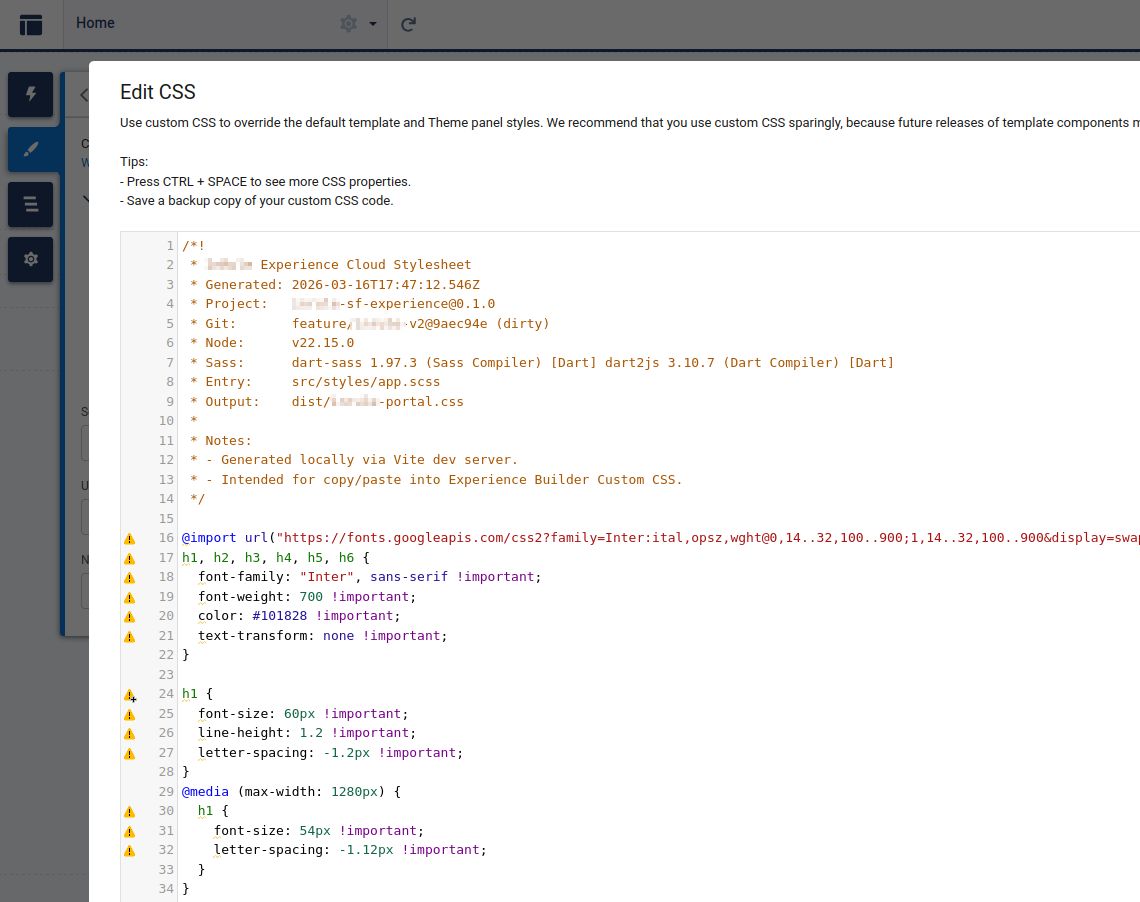
We added one other small detail that turned out to be useful: build metadata at the top of the generated CSS.
/*!
 * Experience Cloud Stylesheet
 * Generated: 2026-03-16T17:47:12.546Z
 * Project:   [email protected]
 * Git:       feature/portal-v2@9aec94e (dirty)
 * Node:      v22.15.0
 * Sass:      dart-sass 1.97.3
 * Entry:     src/styles/app.scss
 * Output:    dist/portal.css
 */
The deployed artifact was still being pasted into Salesforce. That’s a compromise. But it was a traceable compromise. The banner told us when a file was generated, which Git revision it came from, and which toolchain produced it.
When your deployment process is essentially copy and paste, knowing exactly what you copied is valuable.
You don’t always need to automate the final deployment step. Sometimes the best return comes from automating everything leading up to it, then making the remaining manual step predictable and auditable.
A Local Snapshot Is Not Salesforce
There was an important limit to this approach: the saved pages weren’t a functioning clone of Experience Cloud.
A captured page can help you work on layout, typography, spacing, responsiveness, and visual components. It can’t reliably reproduce authentication, permission-based views, live data, or every bit of Lightning runtime behavior.
The project’s own README calls it a styling sandbox, not a replacement for Salesforce testing.
So the workflow still had a final loop back into the real portal: paste the compiled stylesheet, verify it in Experience Builder and the live application, check the relevant page states, and adjust when Salesforce rendered something differently.
That’s not a flaw in the approach. It’s an acknowledgment of what we were actually trying to accomplish.
Salesforce itself warns that global CSS overrides can be fragile when they depend on internal component markup. That makes final testing important—especially across template or platform changes. Its developer documentation says as much.
The goal wasn’t to eliminate those risks. It was to stop paying the full cost of the Salesforce editing loop for every tiny change.
The Right Amount of Engineering
This is where developers can get into trouble.
When a platform fights us, our instinct is to repair the platform. Build the perfect scaffolding. Normalize every strange behavior. Put everything through the approved architecture, with a clean deployment pipeline and no manual steps.
Sometimes that’s justified. If you’re going to maintain a large application for years, invest accordingly.
But this project had a fixed platform, a constrained scope, a real budget, and a launch date that wasn’t moving.
We needed enough structure to deliver the redesign quickly and make subsequent styling changes manageable. We did not need to turn a portal restyle into a Salesforce engineering initiative.
A local snapshot, organized SCSS, a Vite server, and one compiled output file got us there.
Not perfect. Not especially elegant in some abstract architectural sense. Just the amount of engineering the problem called for.
A useful development environment doesn’t have to replicate the production environment. It has to shorten the feedback loop for the work you’re doing, while leaving you a reliable way to verify the result in production.
Don’t spend 500 hours engineering something perfect that doesn’t move the business forward.
Spend 40 solving the parts that actually matter.